How can customers sign up for new arrival notifications?
Step One: Select the proper tool
Click the 'Marketing' link under the 'Website' heading in the Control Panel menu.
Step Two: Open new arrival notification
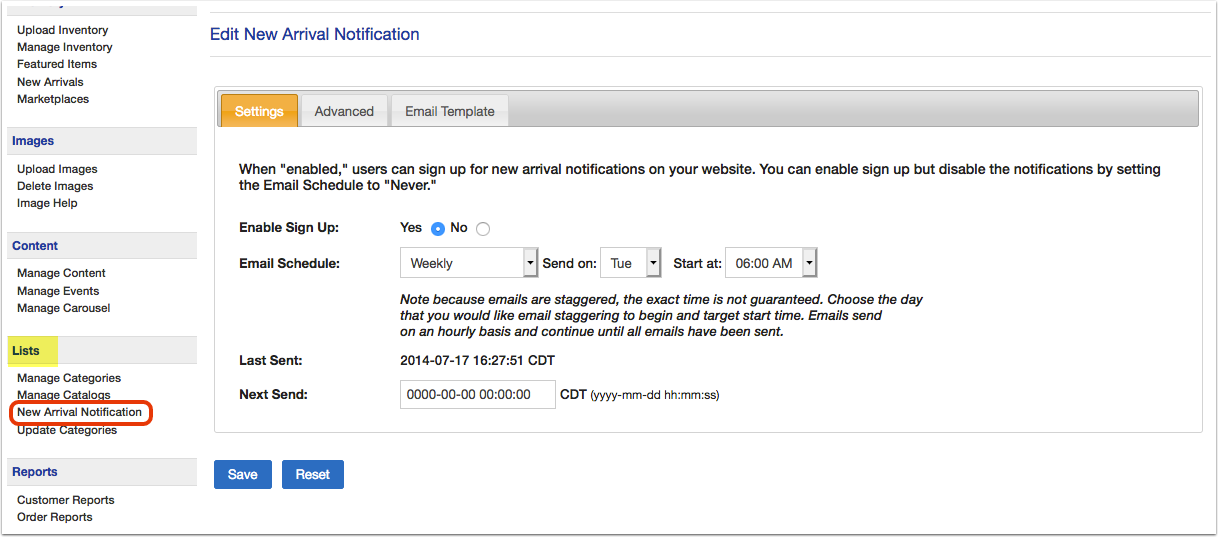
Click on the 'New Arrival Notification' section.
Step Three: Configure email schedule
On the 'SETTINGS' tab, change 'Enable Sign Up' to 'YES'. Then, select how often, which day, and what time the emails should be sent.
Step Four: Configure Advanced Settings
Next, click on the 'ADVANCED' tab. You can choose whether to automatically add new users to the email list and if you'd like to include an "other" field.

Note: If you use Google Analytics, this is also where you can find the Google UTM Code.
Step Five: Configure Email Template
Finally, click on the 'EMAIL TEMPLATE' tab. Write in the email address you would like the notifications to be from. Then, edit the email subject, intro, closing, and footer. When you are finished, scroll up/down to click 'SAVE' button.