How do I Connect to Amazon? (2023)

Effective December 31, 2022, Amazon Marketplace Web Service (MWS) requires that all third-party developed applications by selling partners ("public applications" like BookRouter) must be fully integrated with Amazons new Selling Partner API (SP-API). Bibliopolis has updated the BookRouter integration to support SP-API but for the updates to take effect sellers must reconnect to Amazon under the Marketplaces page in their admins.

Bibliopolis only supports the US / North American Amazon Marketplace (US, CA, MX). We do not support Amazon EU, JP, CN, IN or AU.
Connecting BookRouter to Amazon

Before you begin, please email support@bibliopolis.com with your interest in purchasing the Amazon BookRouter Plus option. The service is $25/month with no setup fees. Amazon is included in our eBay package as well.
Also before getting started, You will need to have a "Amazon Seller Central" account open. You can sign up or login at sellercentral.amazon.com/
Step One: Select the proper tool
In the 'BookRouter Control Panel', under the 'Routing' heading, and click on the 'Marketplaces' link.
Step Two: Open Amazon Settings
In the Marketplaces list, locate 'Amazon'. Then, click the 'Edit' icon on the right end side to open it's settings page.
The Amazon settings page is opened as shown below.
Step Three: Connect to Amazon
Under the 'Amazon Connection' heading, click on the 'Connect' link to connect to your Amazon seller account.
Step Four: Sign in to your 'Amazon Seller Central' account
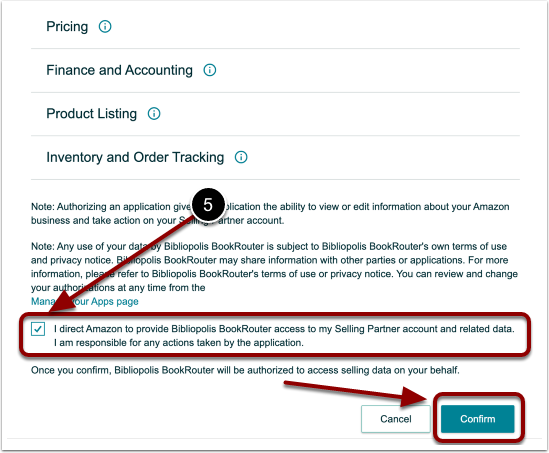
Step Five: Grant BookRouter Access
Check the box that reads "I direct Amazon to provide Bibliopolis BookRouter access to my Selling Partner account and related data. I am responsible for any actions taken by the application." and click the 'Confirm' button.
Step Six: Verify Authentication
You should see this screen if you have been properly authenticated.